Ads
one build, three networks.
Use AdMob, Unity Ads and ironSource LevelPlay, alone or together, from one build. Enter the ids in the console and point each network's reward callback to your Cloud Function. Points for a video are credited only by that callback.
01How a rewarded video is credited
firebase/functions/src/ssv/ and adsession.ts.- The app asks for a sessionIt calls
requestAdSession, which checks the daily cap and the cooldown, writesadSessions/{nonce}with statuspendingand returns the one-timenonce. The session expires after 15 minutes (SESSION_TTL_MSinfirebase/functions/src/adsession.ts). - The app shows the videoIt hands the user id and the nonce to the ad SDK (
app/lib/ads/native_adapters.dart): AdMob asuserId+customData, Unity asserverId=uid:nonce, LevelPlay as the inituserId+setDynamicUserId(nonce). - The ad network calls your functionAfter the user watched, the network's server calls
ssvAdmob,ssvUnityorssvIronsource. With a waterfall, whichever network served the video calls back. - The function checks the signatureA bad signature answers 403
bad signature; a missing secret (Unity, LevelPlay) answers 403not configured. Nothing is written in either case. - One Firestore transaction credits onceIt removes duplicates (
ssvEvents/{network}_{transaction id}), matches the pending session of the same user, marks itverified, adds the points tousers/{uid}and writes a ledger row inusers/{uid}/ledger. A mismatch opens a fraud flag instead and credits nothing. - The app shows the new balanceThe app listens to the user document live. After the video it waits up to 30 seconds for the credit; if it has not arrived by then it shows "Thanks for watching! Your points are being verified and will appear in a moment." and the balance updates by itself when the callback lands.
The app never credits itself. If the callback URL is missing or wrong in the network's dashboard, users watch videos and receive nothing. Set up the callback before you release, and test it (how).
02Choose the networks
The networks are set in console → Mediation: a waterfall the app runs itself (default, AdMob only), or one mediator SDK. See Mediation and placements. All three SDKs are in every build, and the app reads the choice from config/public, so switching needs no new build.
Console → Ads still holds the older single-network settings. The app uses them only when the Mediation and Ad placements values are absent:
| Setting (console → Ads) | Default | Used for |
|---|---|---|
| Ad network | AdMob | The fallback for an empty waterfall list, and for the Status checks "Ad unit ids set for the chosen network" and "Rewarded-ad verification secret set". |
| Interstitial every n-th screen change | 0 | Only when ads.placements.interstitial is absent. Use Ad placements instead. |
| Seconds between interstitials (minimum) | 120 | Same. |
| Banner on the home screen | off | Only when ads.placements.banner is absent. |
Users who bought remove-ads, and VIP users while No non-rewarded ads for VIP users is on (default), see no non-rewarded ads (adFree in app/lib/ads/ad_policy.dart). Rewarded videos stay available because the user chooses them.
03Ids and keys per network
Each network has its own section in the console (AdMob units, Unity Ads units, ironSource LevelPlay units). The verification secret is the last field of that section. The Status page warns when the network chosen under Ads lacks its required ids or its verification secret. Check the other networks of your waterfall yourself.
| Network | Required ids | Also available | Verification secret (console field) |
|---|---|---|---|
| AdMob | Android rewarded unit, iOS rewarded unit | Interstitial, banner, app-open, native and rewarded-interstitial units per platform | None. Verified with Google's public keys. |
| Unity Ads | Android and iOS game ids, Android and iOS rewarded units (placement ids) | Interstitial and banner units | Unity S2S secret: sent to you by Unity Ads support (how to ask) |
| ironSource LevelPlay | Android and iOS app keys, Android and iOS rewarded units | Interstitial and banner units (native ads come from AdMob) | ironSource private key: the private key shown in the LevelPlay server-to-server callback settings (where) |
Secrets are write-only in the console and only an owner can change them. The console stores them encrypted with ADMIN_SECRET_KEY and writes the plain values to config/private, which only Cloud Functions and the console's service account can read (security rules deny every app user). Read Encryption keys before you ever change that key.
04Server-to-server callback URLs
Replace REGION-PROJECT with your region and project id, for example us-central1-my-project. The region is FUNCTIONS_REGION in firebase/functions/.env (default us-central1). firebase deploy prints the function URLs, and Firebase console → Functions lists them. Set the console's Backend → Cloud Functions base URL to https://REGION-PROJECT.cloudfunctions.net as well.
| Network | Callback URL | Setup |
|---|---|---|
| AdMob | https://REGION-PROJECT.cloudfunctions.net/ssvAdmob | AdMob |
| Unity Ads | https://REGION-PROJECT.cloudfunctions.net/ssvUnity | Unity Ads |
| ironSource LevelPlay | https://REGION-PROJECT.cloudfunctions.net/ssvIronsource | LevelPlay |
Each endpoint accepts GET and POST and answers 405 to anything else. One Firebase project, one set of URLs: if you have a staging and a production project, give each its own ad units (or its own callback setting), or callbacks reach the wrong project and open unknown_session fraud flags.
Ad network dashboards are redesigned often. The screenshots below were taken on 2026-10-20 in the author's own accounts, with a demo app named "Watch and Earn Demo" and account identifiers covered. If a menu has moved since, the numbered fields keep the same names, and each section links the network's official guide.
05Set up AdMob server-side verification
- Open your rewarded ad unitAdMob → Apps → your app → Ad units → your rewarded unit → Advanced settings → Server-side verification (figures 1 and 2). Google's guide: developers.google.com/admob/android/ssv.
- Paste the callback URL
https://REGION-PROJECT.cloudfunctions.net/ssvAdmob. Do it for the Android and the iOS rewarded unit, and for your rewarded-interstitial units if you use that placement: the app sends the same verification data with both formats. - No secretAdMob callbacks are signed by Google. The function checks them against Google's published keys (
https://www.gstatic.com/admob/reward/verifier-keys.json, cached for up to 6 hours). There is nothing to enter in the console. - Enter your unit idsConsole → AdMob units. While a unit id is empty the app uses Google's test unit, which is not your ad unit, so your callback URL is not attached to it.
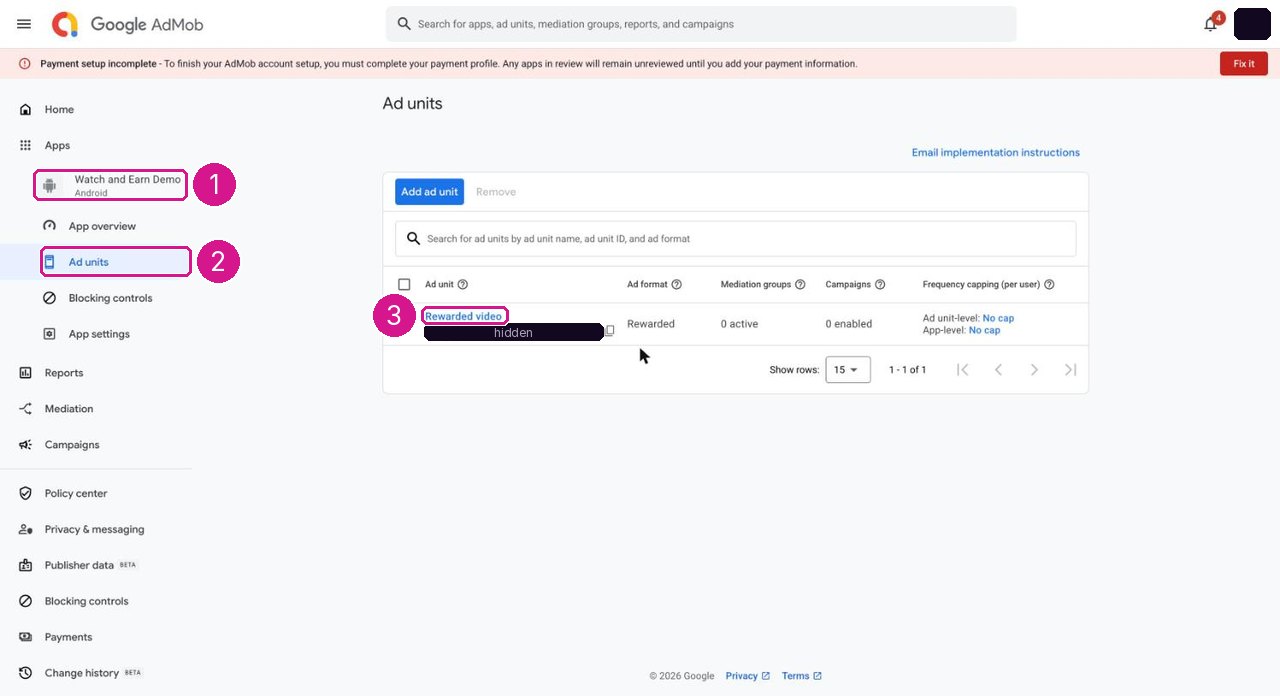
- Your app, under Apps.
- Ad units.
- Your rewarded ad unit (its id is covered here).
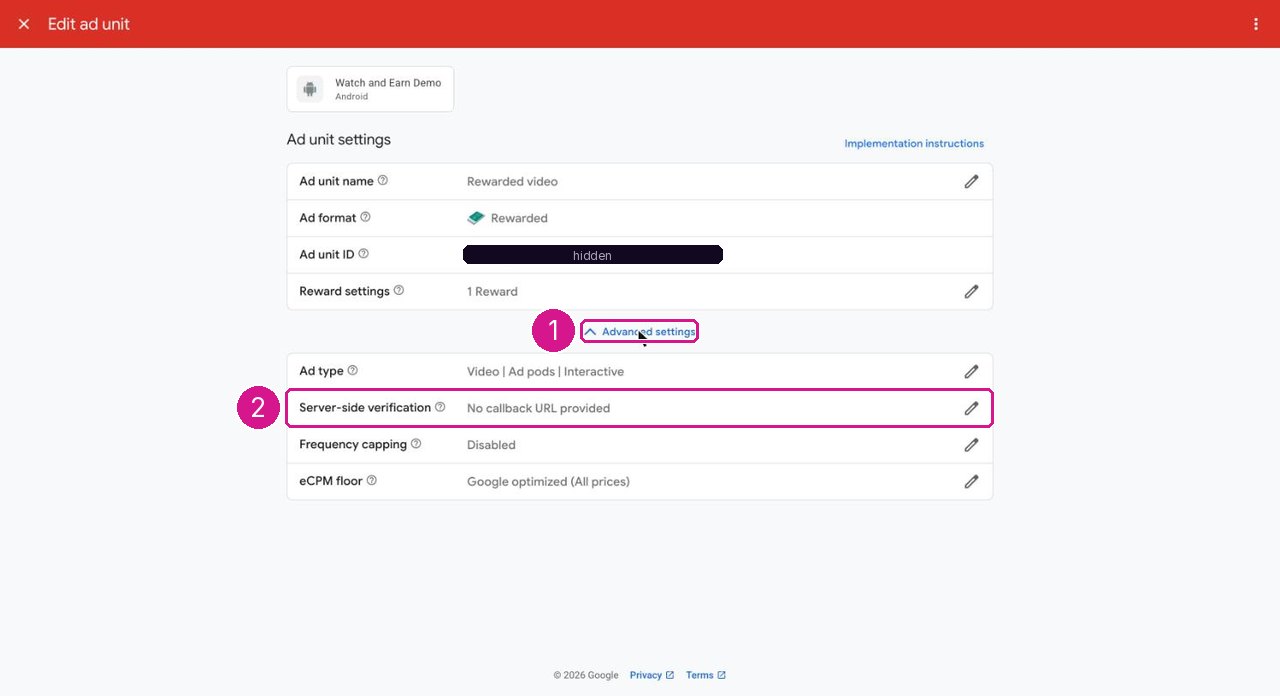
- Advanced settings.
- Server-side verification: click the pencil at the end of the row, then Set up and verify callback url.
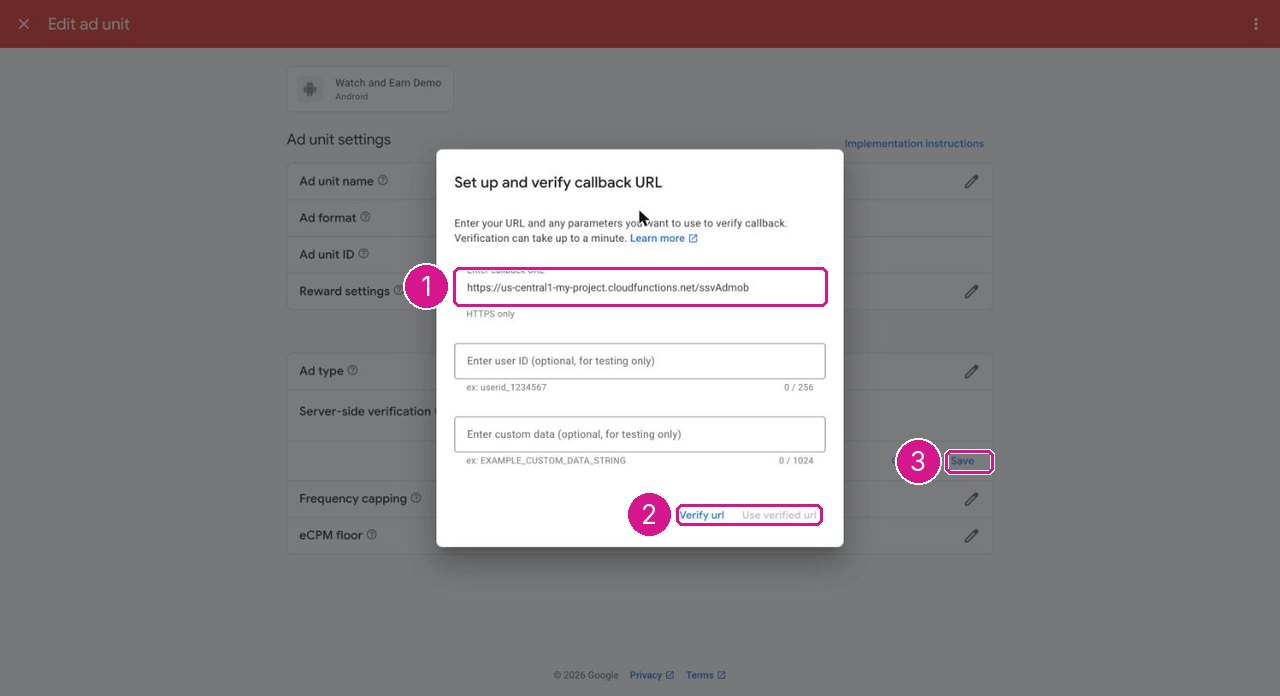
us-central1-my-project; use your own region and project, and deploy the functions first so the URL answers.- Callback URL:
https://REGION-PROJECT.cloudfunctions.net/ssvAdmob. Leave the user id and custom data fields empty. - Verify url, then Use verified url.
- Save.
06Set up Unity Ads S2S callbacks
Unity Ads has no self-service field for this: Unity Ads support registers your callback URL and sends you the secret. Unity's guide: S2S redeem callbacks.
The secret comes from a person at Unity Ads support, not from a dashboard, so it is the slowest step of the ad setup. Unity publishes no response time for these requests. Plan for several business days, and allow up to two weeks before you count on Unity rewarded videos. Send the e-mail below as soon as your Unity project and Game IDs exist, well before your release date, and launch with another network first in the rewarded waterfall (see While you wait for the secret). Keep Unity's reply in your password manager: the console never shows the secret again, and you need it if you ever rotate ADMIN_SECRET_KEY.
What to put in the e-mail to Unity Ads support
Fill in the brackets. Your Game IDs are the values you enter in console → Unity Ads units → Android game id and iOS game id; your organisation and project identifiers are shown in your Unity dashboard.
Subject: Enable S2S redeem callbacks for [app name]

Hello Unity Ads support,

please enable server-to-server redeem callbacks for these games and send me the secret (hash key) for verifying them.

Organization ID: [your Unity organization id]
Project ID:      [your Unity project id]
Game ID(s):      Android [android game id], iOS [ios game id]
Platform(s):     [Android / iOS]
Store app id:    Android package [com.example.app], iOS App Store id [1234567890] / bundle id [com.example.app]
Rewarded placement ids: Android [placement id], iOS [placement id]
Callback URL:    https://[REGION]-[PROJECT].cloudfunctions.net/ssvUnity

The app passes the serverId (sid) as "userId:nonce" when it shows a rewarded video.
Our endpoint verifies the hmac parameter and answers HTTP 200 with the body "1".

Contact: [your name], [your e-mail]

Thank you
Where to find the three ids
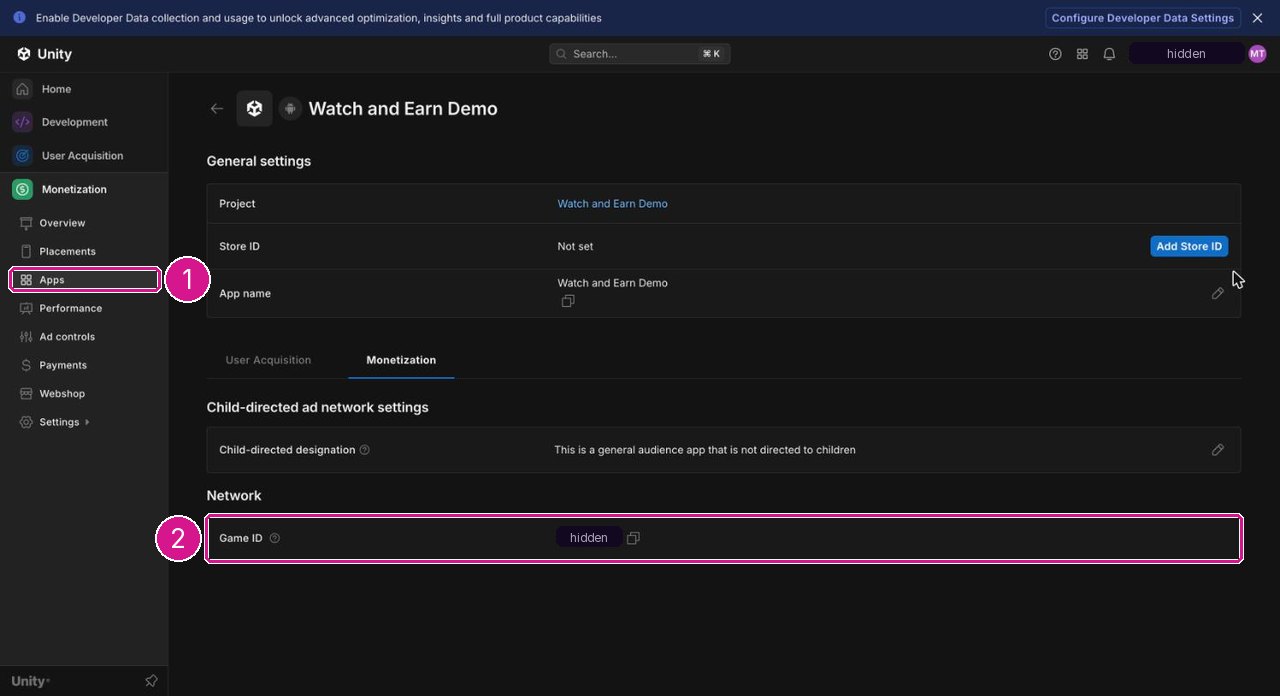
- Monetization → Apps, then the gear icon at the end of your app's row.
- Game ID: copy it into the e-mail, and into console → Unity Ads units → Android game id (or iOS game id for the iOS app).
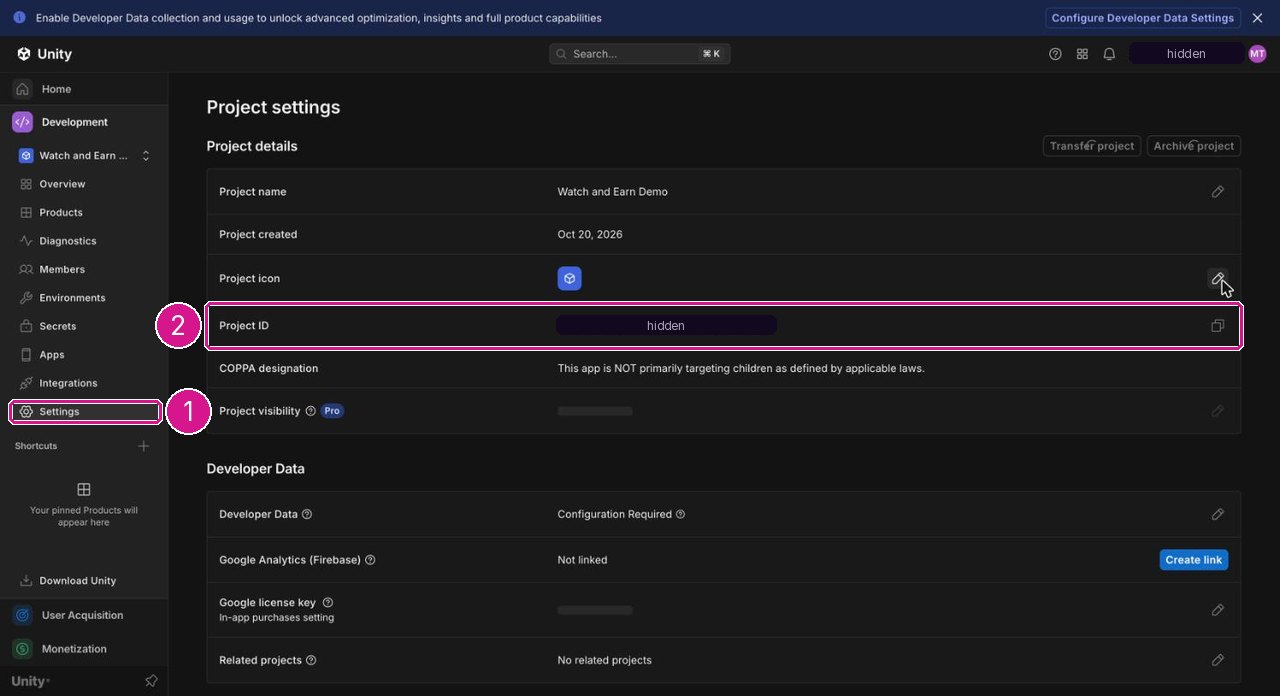
- Settings of your project.
- Project ID: copy it into the e-mail.
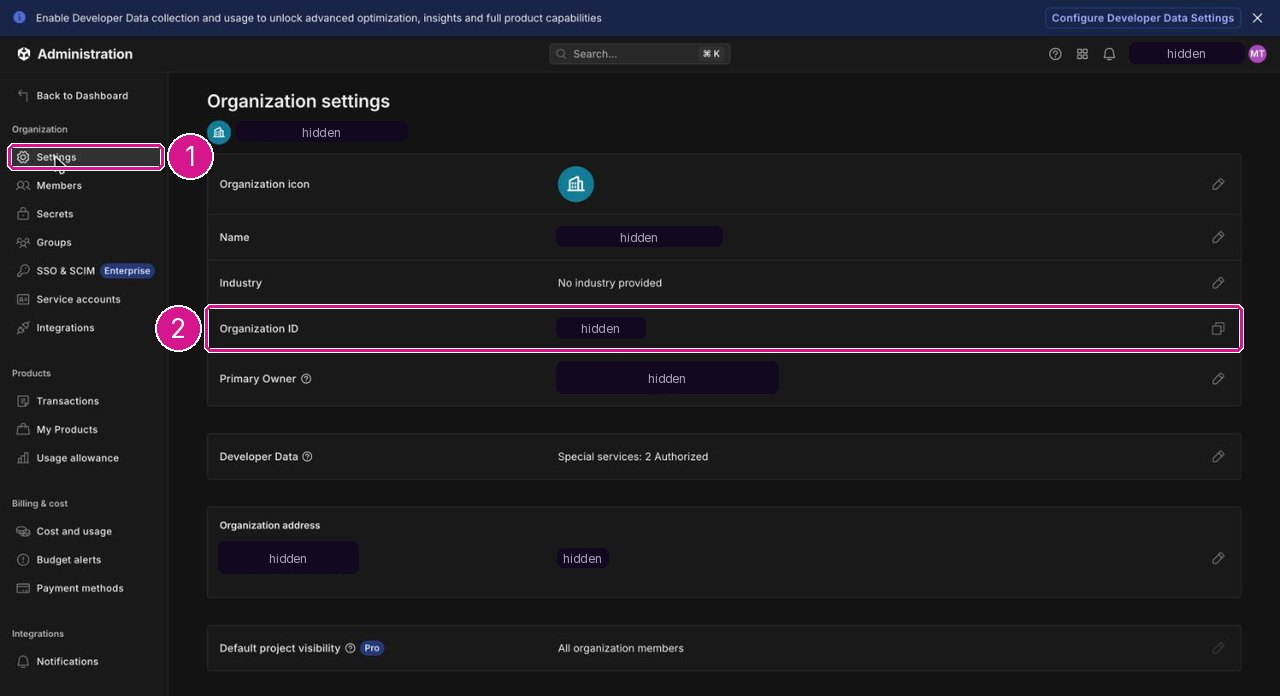
- Settings under Organization.
- Organization ID: copy it into the e-mail.
- Enter the secretWhen support replies, paste the secret into console → Unity Ads units → Unity S2S secret (owner only). Paste it without spaces or line breaks.
- Check itRun the Unity self-test in Test the callbacks, then watch one real video.
While you wait for the secret
- There is no unsigned mode. Without the secret,
ssvUnityrefuses every callback with 403not configured. Users who watch a Unity rewarded video in that time get nothing, so keepunityout of the rewarded waterfall (console → Mediation) until the secret is set. Unity can still serve interstitials and banners, which need no callback. - Earn rewarded videos from another network. Put
admoborironsourcefirst in the rewarded waterfall and set up its callback. - Test the app flow on the emulators. Run the backend with
npm run serveinfirebase/functionsand the app withflutter run --dart-define=USE_EMULATOR=true(debug). Debug builds initialise Unity Ads in test mode (testMode: kDebugMode), and when the SDK reports the reward the app completes the session throughdevCompleteAdSession, which works only in the Functions emulator. This tests the app, the session and the credit, not Unity's signed callback.
The function computes hmac = HMAC-MD5(secret, every other parameter sorted by name, key=value joined with commas), splits sid into uid and nonce, deduplicates on oid and answers 1.
07Set up ironSource LevelPlay S2S callbacks
- Open the server-to-server callback settingsLevelPlay → Apps → the … menu of your app → Set S2S callback (figure 1). Unity's LevelPlay guide: Server-to-server callback.
- Paste the callback URL and set it Active
https://REGION-PROJECT.cloudfunctions.net/ssvIronsource(figure 2). - Copy the private keyLevelPlay fills the Private key field for you; copy it, or replace it with a long random string of your own. Then Save.
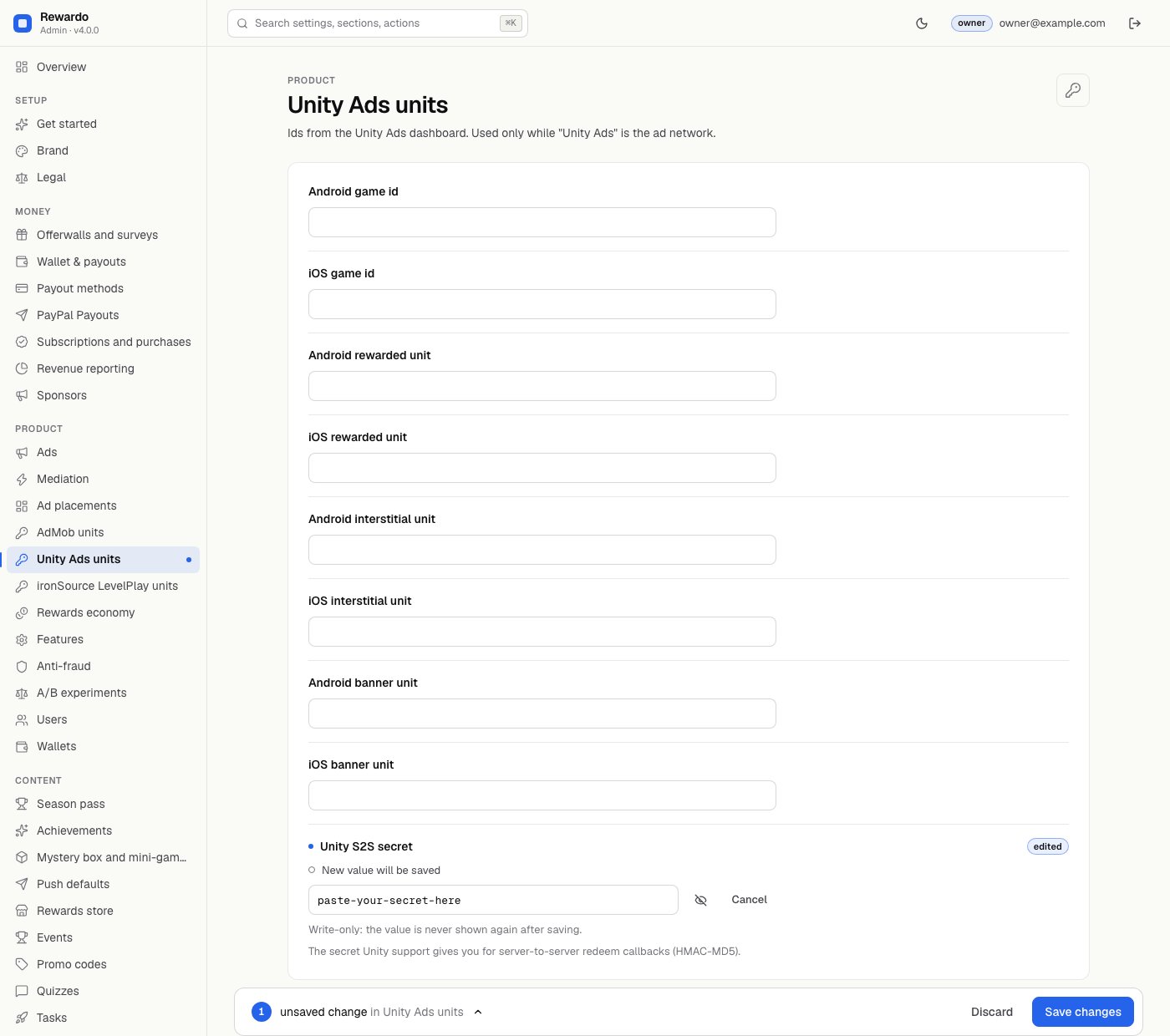
- Enter the same key in the consoleConsole → ironSource LevelPlay units → ironSource private key (owner only).
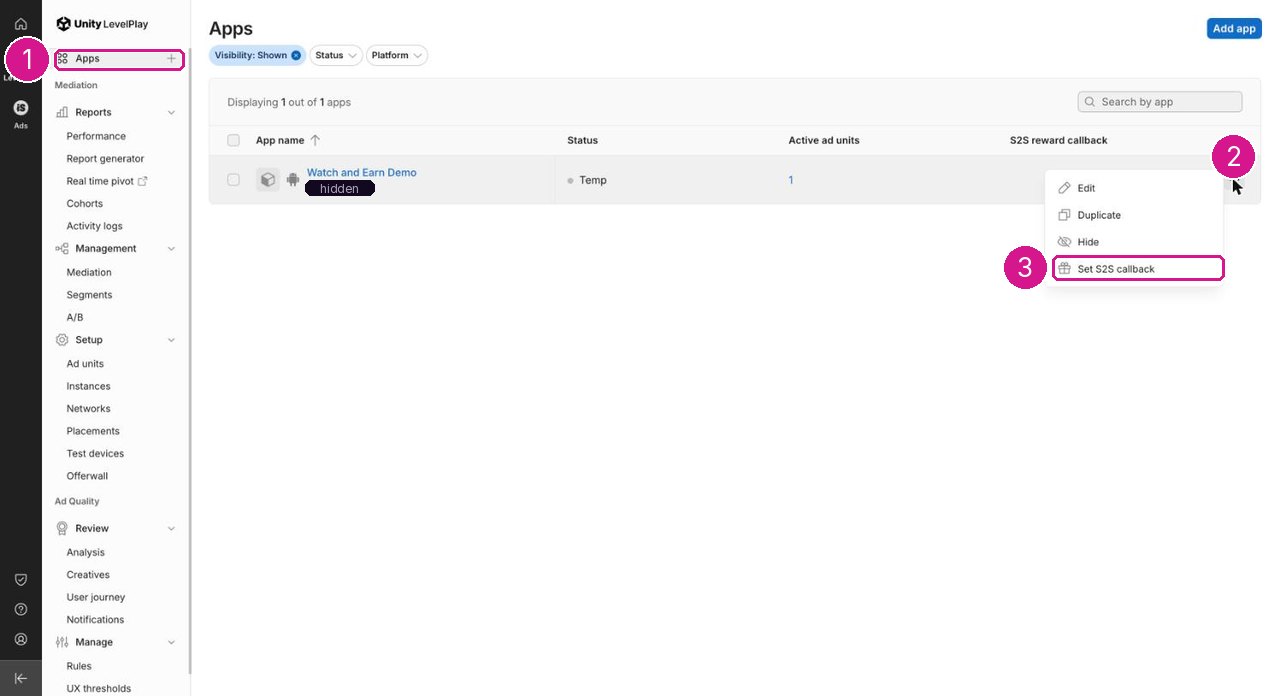
- Apps, under LevelPlay.
- The … menu at the end of your app's row.
- Set S2S callback.
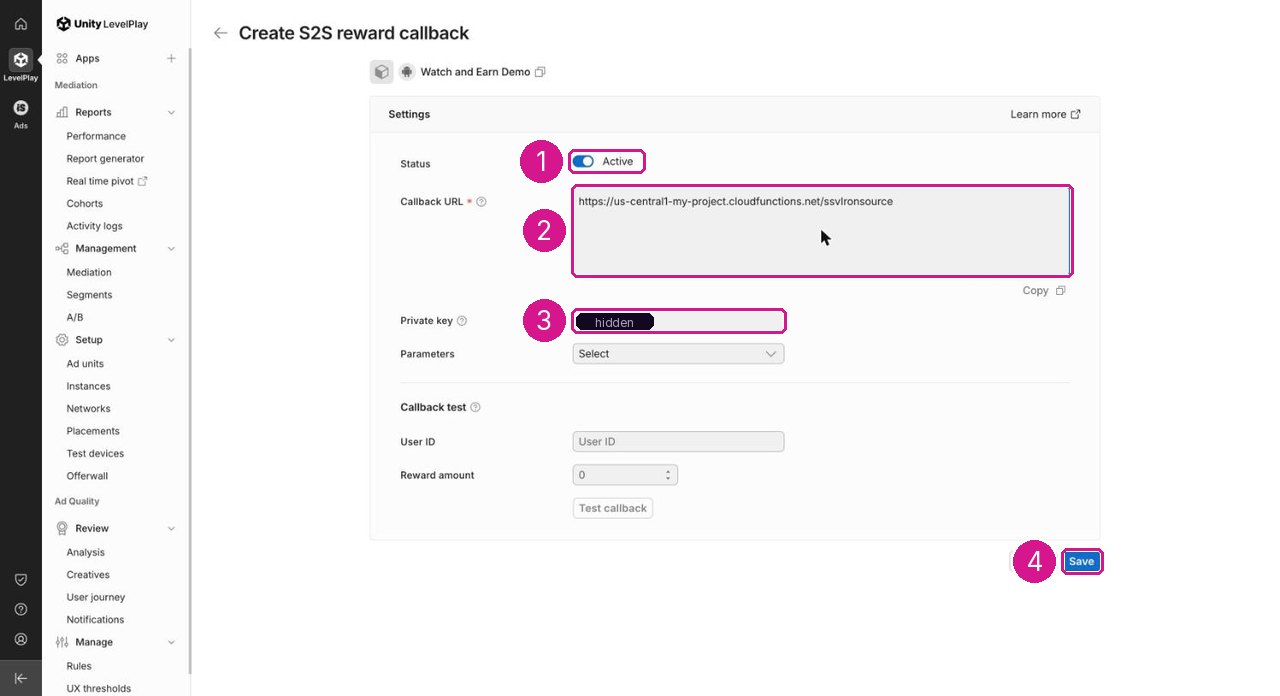
us-central1-my-project; use your own region and project.- Status: Active.
- Callback URL:
https://REGION-PROJECT.cloudfunctions.net/ssvIronsource. - Private key: copy it (covered here) and paste it into console → ironSource LevelPlay units → ironSource private key.
- Save.
The function checks signature = md5(timestamp + eventId + applicationUserId + rewards + private key) and answers <eventId>:OK. The app initialises LevelPlay with userId = uid (arrives as applicationUserId) and sets setDynamicUserId(nonce) before each rewarded video.
The parameter name dynamicUserId comes from the ironSource SDK guides, not the S2S settings page; the function also accepts custom_nonce or an applicationUserId of the form uid:nonce. After setup, watch one real rewarded video and check the result (how). If the nonce does not arrive, the callback is recorded as ignored:no_nonce and nothing is credited.
08Enter the secrets in the console
- Sign in as the ownerOnly owners can set the verification secrets.
- Open the network's sectionUnity Ads units or ironSource LevelPlay units. The secret field is below the unit ids.
- Paste and saveThe field never shows the value again, only whether it is set. On save the console writes it to
config/private.ssv; Cloud Functions pick it up within about 30 seconds (their config cache). - Check Status"Rewarded-ad verification secret set" covers the network chosen under console → Ads only; check the others with the self-test below.
09Test the callbacks
Every command in this section is written for a bash shell and needs curl and openssl: that is Terminal on macOS or Linux, where both tools are already installed. On Windows they do not run as written in Command Prompt or PowerShell. Use either of these, then paste the commands unchanged:
- Git Bash - installed with Git for Windows; it brings its own
curlandopenssl. Open "Git Bash" from the Start menu. - WSL (Windows Subsystem for Linux) - run
wsl --installin PowerShell as administrator, restart, open the Ubuntu terminal and runsudo apt update && sudo apt install curl openssl(Microsoft's guide).
You can also skip this whole section: watching one real rewarded video (3. A real view below) proves the same thing from inside the app, on any operating system.
1. The endpoint answers
Call the URL without parameters. You should get 403, which proves the function is deployed at that address:
curl -i https://REGION-PROJECT.cloudfunctions.net/ssvUnity| Answer | Meaning |
|---|---|
403 bad signature | Deployed and, for Unity and LevelPlay, a secret is set. (AdMob always answers this to an unsigned call.) |
403 not configured | Deployed, but config/private has no secret for this network. |
| 404 or a Google error page | Wrong region, project or function name, or the functions are not deployed. |
2. The secret matches (Unity, LevelPlay)
These commands sign a test callback with the secret you hold, exactly as the function checks it. They run in the bash shell described in the note above. read -rs asks for the secret without showing it or saving it in your shell history. The test callback carries no nonce, so it credits nothing and opens no fraud flag: it is recorded in ssvEvents as ignored:no_nonce.
# Unity Ads: paste the S2S secret, press Enter
read -rs SECRET
OID="selftest-$(date +%s)"
H=$(printf 'oid=%s,sid=selftest' "$OID" | openssl dgst -md5 -hmac "$SECRET" | awk '{print $NF}')
curl -i "https://REGION-PROJECT.cloudfunctions.net/ssvUnity?oid=$OID&sid=selftest&hmac=$H"
# expected: 200 with the body "1"
# ironSource LevelPlay: paste the private key, press Enter
read -rs KEY
TS=$(date -u +%Y%m%d%H%M); EID="selftest$(date +%s)"
SIG=$(printf '%s%s%s%s%s' "$TS" "$EID" selftest 1 "$KEY" | openssl dgst -md5 | awk '{print $NF}')
curl -i "https://REGION-PROJECT.cloudfunctions.net/ssvIronsource?timestamp=$TS&eventId=$EID&applicationUserId=selftest&rewards=1&signature=$SIG"
# expected: 200 with the body "selftest…:OK"A 403 bad signature here means the secret in the console is not the one you typed. AdMob cannot be self-tested this way because only Google can sign its callbacks.
3. A real view
Watch one rewarded video on a real device with your own unit ids (use the network's test-device setting so you do not click your own live ads). Within seconds the balance goes up, the console Ledger shows an ad row, and ssvEvents has a document with the outcome credited. If not, follow Points not credited after a video.
10Test ids ship by default
You do not have to take that on trust. One command, run on the folder you unzipped, checks every source file for an AdMob id that is not Google's test id, for a network key or game id that ships with a value instead of empty:
node source/tools/check_ad_ids.mjsIt needs only Node (already required to build this item) and runs the same on macOS, Linux and Windows. A clean package prints no author-owned AdMob, Unity Ads or ironSource identifier in this package and exits 0. Run it again after you paste your own ids, and it will list them - that is the point: from then on they are your ids, in your own console, and the ad revenue is yours.
Every network id in this item is typed into the operator console and stored in your own Firebase project. None of them is compiled into the app, so no identifier of the author can collect anything.
The package contains only Google's public AdMob test ids; a test enforces it. When an AdMob unit id is empty, the app falls back to Google's test unit for that format (app/lib/ads/ad_adapter.dart), so you see test ads during development. They never earn anything. The other two networks show nothing until their ids are entered, and a waterfall skips them.
11Replace the AdMob test app ids
Required before releaseThe Google Mobile Ads plugin needs an AdMob app id inside the app itself. The package ships Google's test app ids:
| File | Key | Shipped test value |
|---|---|---|
app/android/app/src/main/AndroidManifest.xml | com.google.android.gms.ads.APPLICATION_ID | ca-app-pub-3940256099942544~3347511713 |
app/ios/Runner/Info.plist | GADApplicationIdentifier | ca-app-pub-3940256099942544~1458002511 |
Replace both with your own app ids from AdMob → Apps → App settings (one Android app, one iOS app).
app/test/no_cash_out_test.dart checks only the Dart code for AdMob ids, so putting your own app id in AndroidManifest.xml and Info.plist does not break flutter test. Enter your unit ids in the operator console, not in the code.
The Google plugin is in every build and also provides the consent form below, so keep a valid AdMob app id even if you serve ads from another network.
If you use another network on iOS, also add that network's SKAdNetworkItems entries to Info.plist as its integration guide describes. The package lists Google's entry only.
12Consent (UMP)
Before any ad request the app runs Google's User Messaging Platform (gatherConsent() in app/lib/ads/native_adapters.dart): it shows the consent form when required (GDPR, US states) and passes the result to whichever network is active. Users can reopen it in Settings → Ad privacy when their region requires it.
- Create the messagesAdMob → Privacy & messaging. Create the GDPR message (and the US state regulations message if you serve the US) for your apps.
- Add your ad partnersIf you use Unity or ironSource, add them to the ad partners list of the GDPR message.
- iOS tracking text
Info.plistcontainsNSUserTrackingUsageDescription. Adjust the text to your app.
13Check it worked
- Console → Status shows no warning for "Ad unit ids set for the chosen network" and "Rewarded-ad verification secret set", and no skipped waterfall lines
- Every network in your rewarded waterfall has its callback URL and secret set, and its self-test answers 200 (Test the callbacks)
- Watch one video on a real device: the balance goes up within seconds and the console Ledger shows an
adrow - No new rows in Fraud flags for your own test views